Kyrio · Family organizer app

Family organizer app — calendar, chores, meals, lists, all in one

Most “family organizers” are calendar-plus-list apps with a chore chart bolted on. Kyrio puts calendar, chores, meals, shared lists, and rewards on one surface that every member actually uses — including the 7-year-old.

  • Calendar, chores, meals, lists, rewards — one family login
  • Per-member views so each person sees just their stuff
  • Imports Google, iCloud, and Outlook calendars (Pro)
  • On Android (iOS coming soon), no ads, EU-hosted

Updated May 3, 2026

Kyrio family organizer app home dashboard for the whole household

One app instead of five

The average family runs the calendar in Google, the chores on the fridge, the grocery list in Keep, and the meal plan nowhere. Four surfaces, one family. Kyrio pulls all four onto one screen with one login.

The win isn’t just “fewer apps.” It’s that chores, meals, and the calendar actually talk to each other — “set the table” becomes a chore tied to tonight’s dinner; Tuesday’s soccer practice shows up on the kid’s simplified view without you having to duplicate it.
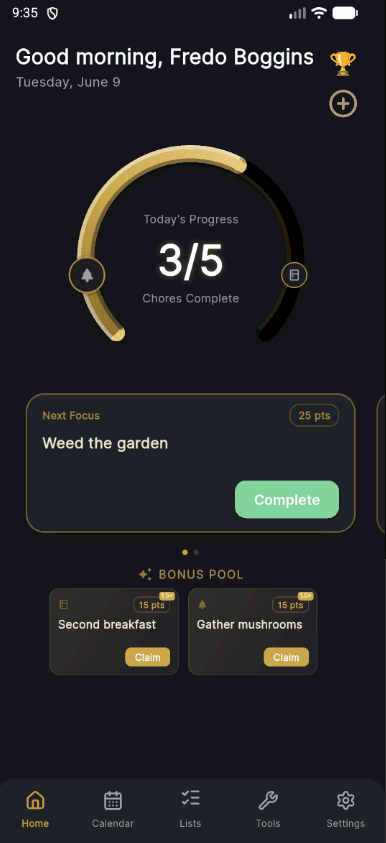
Kyrio home dashboard combining calendar, chores, and meals

Every member gets a view that fits them

The kids’ view is simple, icon-heavy, and shows only what’s theirs: their chores, their events, their rewards balance. The adults’ view is the full grid with filters. Grandparents can have a calendar-only view. Same data, five different surfaces based on who’s looking.

This is the whole reason most shared-family apps fail: they’re designed for one power user and dumped on everyone else. Kyrio is designed for every surface individually.

Imports what you already have

We don’t ask you to migrate. Kyrio reads your existing Google, iCloud, or Outlook calendar so events flow in automatically. Import recipes from blogs you already use. Keep using Apple Notes for your work stuff. Kyrio is additive, not replacement-or-nothing.

When you’re ready to make Kyrio the source of truth, you can — but there’s no setup screen forcing that decision on day one.

Honest pricing: one plan for the whole household

Kyrio has a genuinely usable free tier — calendar, chores, meals, shared lists, and per-member views for up to five members. Kyrio Pro unlocks the whole household with no limits, plus the chore dashboard, calendar sync, and the credentials vault. Every new household gets 30 days of Pro free — no card required.

One Pro subscription covers everyone, so you don’t pay per seat. Compare to Cozi Gold or FamilyWall Premium (subscription required for multi-device sync) in the full Cozi breakdown if you want the line-by-line.

How Kyrio compares for this

FeatureKyrioCoziFamilyWallPicniic
Shared family calendarIn-app calendar with per-member color coding and events.YesYes

Color-coded per-member events, the flagship Cozi feature.

YesYes
Google / iCloud syncImport or sync with Google, iCloud, or Outlook calendars.Paid

Calendar sync with Google, Apple, and Outlook is included with Kyrio Pro.

YesYesYes
Shared listsGrocery, to-do, or custom lists synced across the family in real time.YesYesYesYes
Family message boardShared board for notes, announcements, and quick communication.YesNoYesYes

Click any competitor name for the full feature-by-feature comparison.

Frequently asked questions

How does this compare to Cozi, FamilyWall, or Picniic?
Cozi is a calendar-and-list app with simple chores bolted on. FamilyWall is similar with a stronger chat emphasis. Picniic is feature-wide but the mobile apps are dated. Kyrio is the newer, actively-developed, whole-family surface — same calendar and lists, plus a real chore engine and per-member views. Full comparisons in the buyer’s guide.
Is there a free version? What does Pro cost?
There’s a free tier you can use long-term — up to five members, three active lists, and the core tools. The full experience is Kyrio Pro, one subscription that covers your whole household. Every new household gets 30 days of Pro free with no card, so you can try everything before deciding. Example price: 49 kr/month or 499 kr/year (varies by country).
Do I have to switch away from Google Calendar?
No. Kyrio Pro imports from Google, iCloud, and Outlook. Most families keep their personal calendar where it is and use Kyrio as the family-wide overlay. You don’t have to choose.
How many family members can join?
Up to five members on the free tier; unlimited with Kyrio Pro. Useful for blended families with co-parents in separate households, or grandparents who want calendar visibility.
Does it work on iPhone and Android?
Kyrio is available on Android today, and an iOS (iPhone) app is coming soon. Everything syncs to your household account, so the iOS app will pick up right where you left off.
Where does my data live?
EU-hosted, GDPR-first. We don’t sell data, don’t run ads, and don’t analyze family content for training. The business model is the Kyrio Pro subscription — not your family’s life.
I already use Todoist / Notion / AnyList. Do I need this?
Depends. Todoist and Notion are generic productivity tools repurposed for families — they work, but you have to design the system yourself. Kyrio is family-shaped from the start: kid views, chores with age-appropriate templates, and points-and-rewards. If you’ve been making Todoist-for-family work for years, Kyrio probably won’t feel necessary. If you’ve been trying to make it work and it’s not sticking, switching helps.