Kyrio · Family meal planner

Family meal planner — weekly dinner planning that actually sticks

Most meal planner apps assume you want to cook 21 different meals a week. You don’t. Kyrio is built around the realistic version: pick five dinners on Sunday, auto-build the grocery list, repeat. The whole family sees what’s for dinner; nobody asks again.

  • Drag-and-drop the week — re-use your family’s actual rotation
  • Grocery list builds itself from the meal plan
  • Whole family sees tonight’s dinner without asking
  • Free on iOS and Android — no recipe paywall

Updated May 3, 2026

Kyrio family meal planner showing the weekly dinner grid

Built for the family rotation, not for Pinterest

Most family-meal failures come from over-planning. You don’t need 21 unique meals a week — you need five dinners that work on a Tuesday with a tired 8-year-old in the kitchen. Kyrio is optimised for that, not for aspirational meal-planning.

Drag your family’s actual rotation onto the week, save it as a template, and copy it forward. Most parents are done planning in under 10 minutes — including the grocery list.
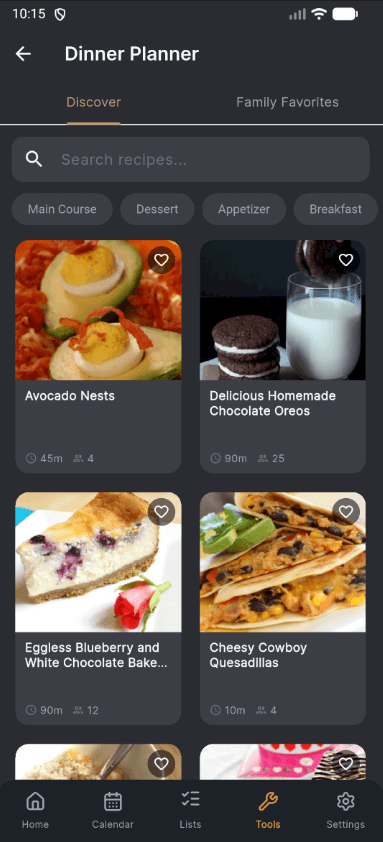
Drag-and-drop weekly dinner grid in Kyrio

The grocery list builds itself

Pick a meal, the ingredients flow into the shared grocery list. Pick a duplicate ingredient on Tuesday and Friday, the list deduplicates automatically. The list is real-time-shared with whoever does the shop, so the “did you remember the milk” text stops happening.

The list is the same one we use for our standalone shared grocery list — same surface, just powered by the meal plan instead of typed in by hand.

Kids can see dinner — and stop asking

“What’s for dinner?” is a load-bearing question in most households, and it’s usually directed at the same parent. Kyrio puts tonight’s dinner on every kid’s home screen. They can see it. They stop asking. That’s the whole feature.

Combine with our age-appropriate chore system — “set the table” becomes a chore tied to tonight’s actual meal, and you’ve got dinner cooked and served before anyone’s annoyed.

No recipe paywall, no AI surcharge

Cozi’s recipe box is a paid feature. Mealime gates the planner above its first tier. Kyrio doesn’t do either. Save your own recipes, paste in URLs from blogs you actually read, or use the built-in AI suggestion (bring-your-own-key, no surcharge from us).

Most families don’t need a recipe library — they need their family’s 20 dinners well-organised. That’s what Kyrio does for free.

How Kyrio compares for this

FeatureKyrioCoziFamilyWallOurHome
Meal plannerWeekly meal planning with recipes and auto-generated shopping lists.YesPaid

Recipe box and meal planner are Cozi Gold only.

PaidNo
Shared listsGrocery, to-do, or custom lists synced across the family in real time.YesYesYesYes
AI assistanceBuilt-in AI that drafts chore rotations, meal plans, or shopping lists.Yes

Bring-your-own API key — no hidden AI surcharge on your subscription.

NoNoNo
Usable free tierA free tier that is usable long-term, not just a 7-day trial.YesYesYesYes

Click any competitor name for the full feature-by-feature comparison.

Frequently asked questions

Is the meal planner actually free?
Yes. Saving meals, planning the week, generating a grocery list, and sharing with the family are all free on iOS and Android. There is no “Premium Recipes” tier you need to pay for before the planner is useful.
Does it suggest meals, or do I have to pick them?
Both. You can build a personal meal library and rotate from it (most families do), or use the optional AI suggestion (bring-your-own API key — no hidden cost). Some weeks you want a system to pick for you; some weeks you already know.
How does the grocery list work?
Each saved meal has its ingredients attached. When the meal goes on the week, its ingredients flow into the shared grocery list. Duplicates merge, items you already have can be marked “in pantry,” and whoever does the shop sees the same list in real time.
Can I import recipes from blogs?
Yes — paste a URL and Kyrio extracts the title, ingredients, and steps. Works with most major recipe sites and the structured-data-friendly food blogs. For sites that don’t have proper recipe markup, you can edit the result before saving.
How is this different from Mealime or Plan to Eat?
Mealime and Plan to Eat are recipe-and-meal apps with a calendar bolted on. Kyrio is a family-context app that includes a meal planner, alongside chores, calendar, and shared lists. If meal-planning is the only thing you want, Mealime is good. If you want one app for the whole family routine, Kyrio is better.
Can the kids add meal requests?
Yes. Each kid can add suggestions to a “meal wishlist” parents see when planning. Useful for getting a teenager invested in family dinner; useful for a 7-year-old to feel heard.
What about dietary restrictions?
Tag meals with simple labels (vegetarian, no nuts, gluten-free, etc.) and filter the planning view. The grocery list reads the tags too, so substitutions are easy.